Proposals
Tracking who opened, viewed, accepted or declined a proposal
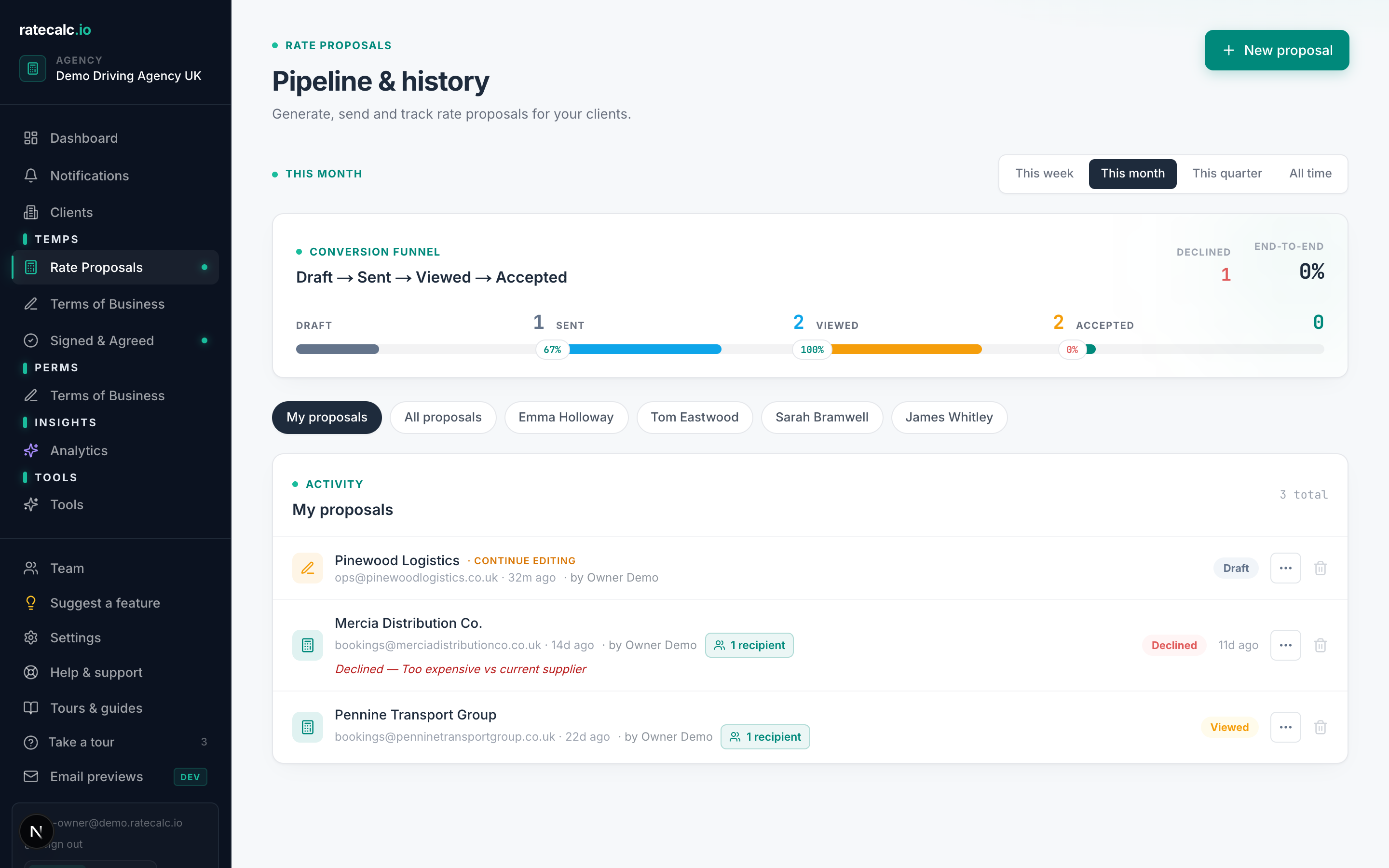
Every proposal has its own link with full activity tracking.
Every proposal you send creates a unique URL. The client does not need an account to view it. You see when they:
- Opened — the link was first clicked
- Viewed — they actually loaded the proposal page
- Accepted — they hit the accept button on the proposal
- Declined — they hit the decline button with optional feedback
Where to see status
Dashboard → Proposals. Each row shows the current status with the timestamp of the latest event. Click into a proposal to see the full activity timeline.
Re-sending a proposal
If a proposal expired, was declined, or you want to send an updated version, duplicate it from the proposals list. The duplicate is a fresh draft you can edit and send anew with its own link.
Related articles
Sending your first rate proposal
Five steps from a blank agency to a sent proposal. Roughly 15 minutes with screenshots.
Rate review tool — turn an accepted proposal into a re-quote
Clone an accepted proposal, apply an uplift, send the review.
E-signature for recruitment Terms of Business (UK, legally binding under eIDAS)
Signature, IP address, timestamp, document version — captured as evidence on every signed ToB.
Last updated: 2026-06-29. Did this not answer your question? Click the chat bubble bottom-right or email hello@ratecalc.io.